Argos - software for audit firms in Russia that work under ISA
Every entry in view. The judgement stays with the auditor.
An auditor’s workstation for journal entries exported from 1C. Every entry goes through 16 tests; materiality and the sample are calculated by the software as reference points; draft working papers are ready by the end of the run. It runs on the firm’s own computer; an external model is used only if you decide so and with the client’s written consent.
Run on a demonstration company: 97 items in the findings list, 24 journal accounts agreed to the trial balance, nothing sent to a model. What the result looks like
- 16journal tests for every entry, and a risk score showing what each test contributed1
- 9standards in the ISA set, from materiality to accounting estimates1
- 13industry groups with procedures and judgement cards1
- 86codes of unusual-transaction indicators from the Rosfinmonitoring reference list, for the auditor to complete1
An engagement from client profile to audit file sign-off
The main engagement path runs in the browser. A journal of hundreds of thousands of lines cannot be read in full by hand, so Argos reads it and brings its findings into one list. Which of them are exceptions is for the auditor to decide.
-
Step 1
Client profile and representations
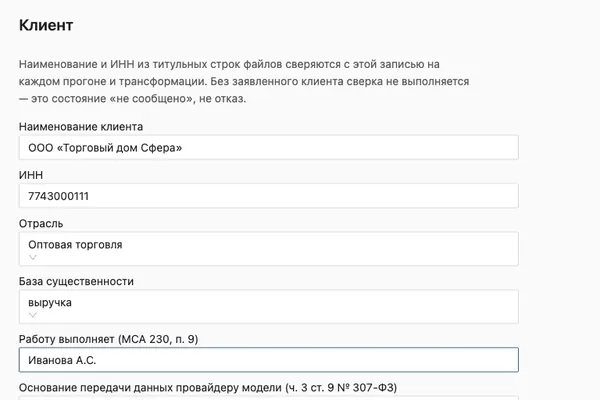
Name, taxpayer number (INN), industry, materiality benchmark, engagement team member, tax regime. Everything the product cannot derive from the data is stated by the auditor, and each statement is printed in the audit file with its source.
-
Step 2
Launch: files, ISA set, sample, circuit
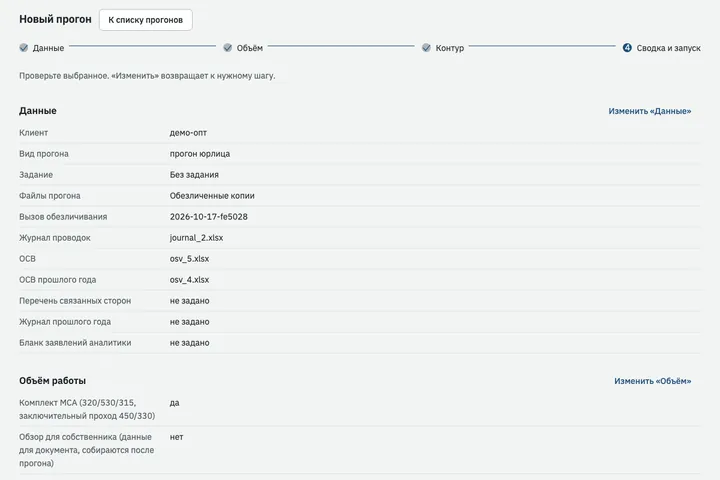
The journal entries and trial balance from 1C are loaded in Excel or CSV exactly as exported: the product finds the header, the totals row and the columns itself and reconciles what it has read. The auditor chooses the ISA set, the sample, the circuit mode and the document style, and sees a summary of the choices before the run starts.
-
Step 3
Working through the findings
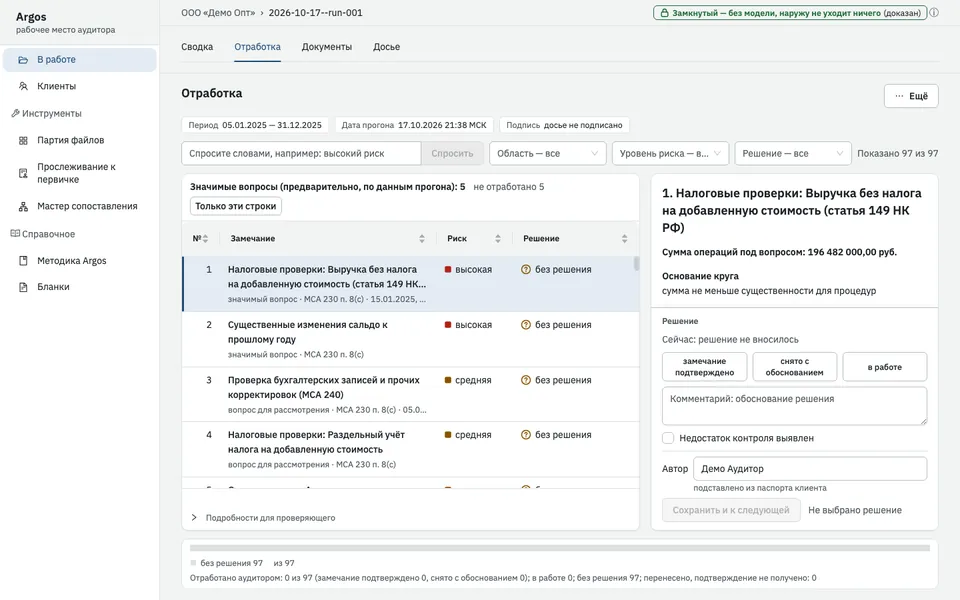
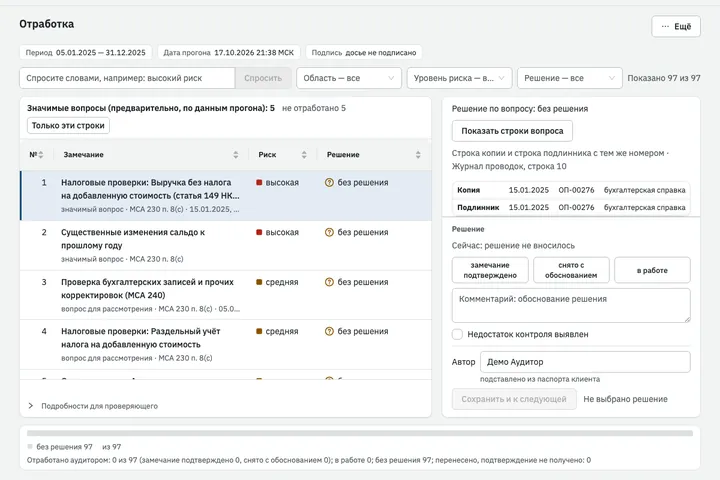
All findings in one list: area, entry, risk level, legal reference, assertion. Each finding has a rationale with the journal lines behind it and a decision panel. The list can be searched in plain words, for example “related parties without a decision”.
-
Step 4
Readiness, sign-off and package
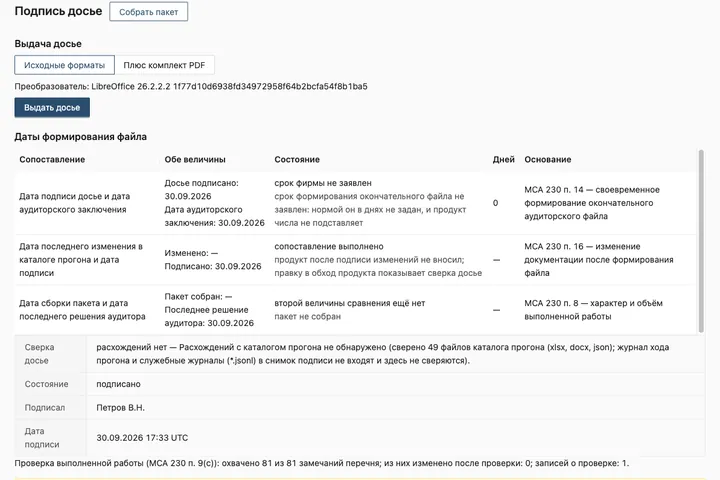
The readiness checklist for external inspection closes an item only on evidence present in the run folder. The engagement partner signs off the audit file; the product checks the dates under ISA 230 and shows any change made outside it.
Audit confidentiality stays under the firm’s control
Under Federal Law No. 307-FZ on auditing, information protected by audit confidentiality may be passed to third parties only with the client’s prior written consent (Part 3, Article 9). That is why the level of model access is chosen for each run.1
Closed circuit
No model is called, and the guard lets no network connections through. All tests, ISA procedures, taxes, sampling and working papers still work.
the pilot starts hereFirm perimeter
The model runs only inside the firm’s perimeter, on a list of allowed addresses. Requests to external addresses are blocked.
Open
An external provider’s model, only with the client’s written consent. Before the run the auditor makes a pseudonymised copy of the input files and checks it by eye. Sampling and tracing are not performed on the copy.
For the security and IT teams
How the product handles data, network and access. Limitations are stated alongside capabilities.
- Where it runs
- On the firm’s auditor’s computer: macOS, Docker, disk encryption. Argos has not yet been run on Windows.
- Sign-in
- The workstation opens in a browser on that machine only; sign-in uses a one-time ticket.
- Data source
- Journal and trial balance exports from 1C in Excel or CSV. The product does not connect to the 1C database.
- Network
- In closed-circuit mode the guard lets no network connections through. It sees connections at application level, and the product states in the audit file what can bypass it. Physical impossibility of network access comes from deploying without a network.
- External services
- The product does not look up counterparty details online: that would reveal that the client is being audited.
- Language model
- Only if the firm decides so and with the client’s written consent, on a pseudonymised copy. The pseudonym map is encrypted and is not included in the audit file package. 500 thousand rows and 10 thousand counterparties are pseudonymised in 85 seconds.2
- Request log
- The circuit mode and the number of external requests are recorded in the run inventory and printed in the working papers.
- Storage
- The run folder is not encrypted; its protection relies on disk encryption.
- Developer access
- To client data only with the client’s written consent (Part 3, Article 9 of Federal Law No. 307-FZ).
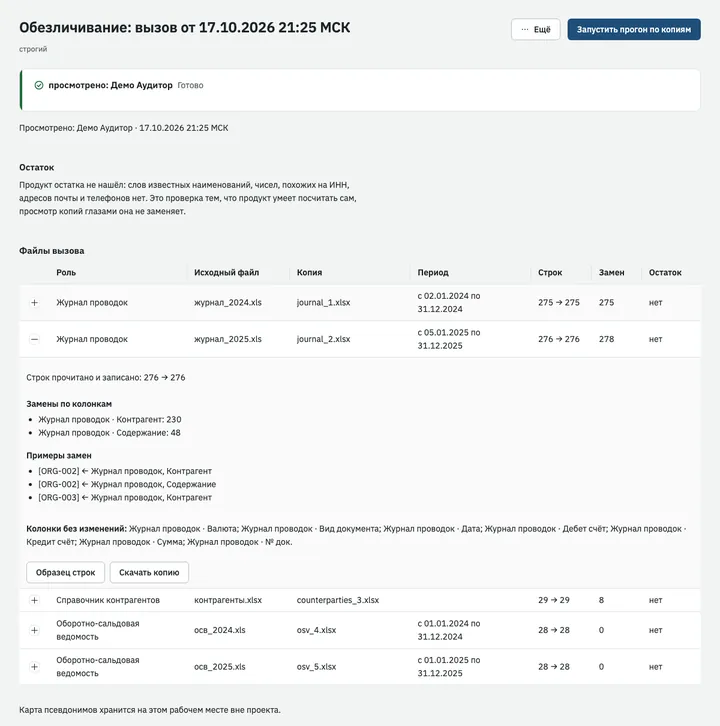
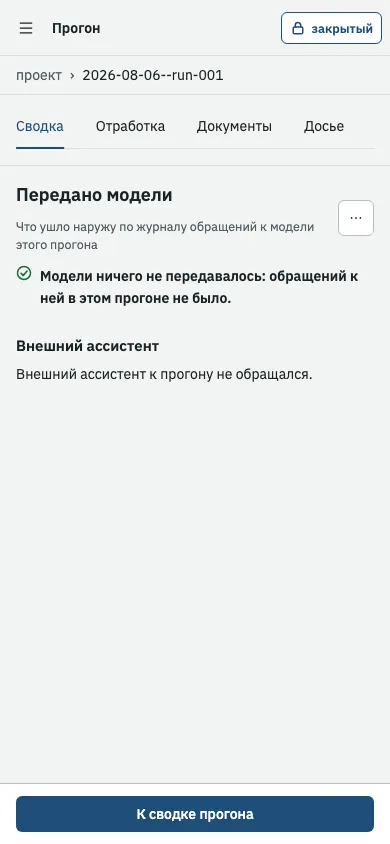
Left: the pseudonymised copy the auditor reviews before the run. Right: the entry “nothing was sent to a model” in the run summary. Interface in Russian.
Methodology by engagement stage and standard
Paragraphs of the standards follow the Russian edition: Order of the Ministry of Finance No. 2n of 09.01.2019 as amended on 16.10.2023; ISA 315 and 540 were brought into force by separate orders.1
| ISA set | Materiality (ISA 320), risk assessment (ISA 315), responses to assessed risks (ISA 330), misstatements (ISA 450), external confirmations (ISA 505), sampling (ISA 530), accounting estimates (ISA 540), related parties (ISA 550), going concern (ISA 570). Working papers are prepared under ISA 230. |
|---|---|
| Data intake | Journal and trial balance from 1C in Excel and CSV. Read balance: rows below the header = read + excluded. Reconciliation of the journal to the trial balance. A mapping wizard for non-standard exports. |
| Planning and risks | Reference points for the auditor’s decision: materiality with the reasoning for the chosen benchmark (ISA 320), a risk matrix with figures (ISA 315), a risk score for every entry explaining what each test contributed. The decision on them rests with the auditor. |
| Journal analysis | 16 tests: reversals, unusual amounts, manual adjustments, weekend postings, round amounts, late postings, duplicates, unusual account pairs, Benford’s law with breakdowns, and others. These are risk indicators, a prompt for investigation; the conclusion is the auditor’s. |
| Sampling and source documents | Sampling under ISA 530: reproducible selection with a recorded seed and upper-limit evaluation. The auditor chooses the method. Tracing to source documents, including exact reading of universal transfer documents (UPD) and VAT invoices in the Federal Tax Service XML format. Requests to the client with tracking of their outcome, a register of external confirmations. |
| Taxes | Checks against the Russian Tax Code as a prompt for investigation: VAT and profits tax arithmetic, VAT-exempt revenue with a reference to Article 149 of the Tax Code, provisions, reliefs for accredited IT companies. For property tax, trade levy, excise duties, mineral extraction tax (NDPI) and additional income tax (NDD), measurement only, without recalculation. |
| Special areas | Related parties from the auditor’s list (ISA 550), going concern (ISA 570), accounting estimates (ISA 540), counterparty details. Indicators of unusual transactions: three journal tests and a form covering the remaining indicators from the Rosfinmonitoring reference list (86 codes), for the auditor to complete. |
| Industries | 13 industry groups, from trade and construction to leasing and non-profit organisations. Procedures on representation: state defence procurement (Article 8.4 of Federal Law No. 275-FZ), procurement under Federal Laws 44-FZ and 223-FZ. In industry procedures a flag is raised on an arithmetic identity or a figure taken from a legal provision. |
| Completion | Misstatements under ISA 450, assertion coverage, working through findings, review of work performed, sign-off, package, issue with a set of PDFs. |
| Special modes | Batches of files, sets of periods up to five years, group consolidation of up to 20 entities, conversion of Russian Accounting Standards (RAS) into IFRS line items. |
An audit file ready for external quality review
Argos presents the result so that it can be filed in the audit file and shown to an inspector.
- Draft working papers in Word with permanent references, a “Prepared by / Reviewed by” header, the team member and dates (ISA 230). The auditor writes the conclusions in them.
- A decision on every finding with a mandatory author and rationale; every action is in the audit trail.
- Readiness checklist for external inspection: each item shows what evidences it and under which provision.
- File checksums seal the audit file after the engagement partner’s sign-off; the check names any changed file.
- Audit file package with an inventory of methodology versions, a code fingerprint and the circuit mode. The calculation part of the run is reproducible.
The report and documents come in one of three styles, all tested in black-and-white print. A firm can apply its own referencing scheme on top of the product’s references.
A run on a demonstration company
Argos has not yet been piloted at an audit firm, so there is no review of a real engagement here. We will publish the first such review with the consent of the firm and its client: what the product found and what to improve.
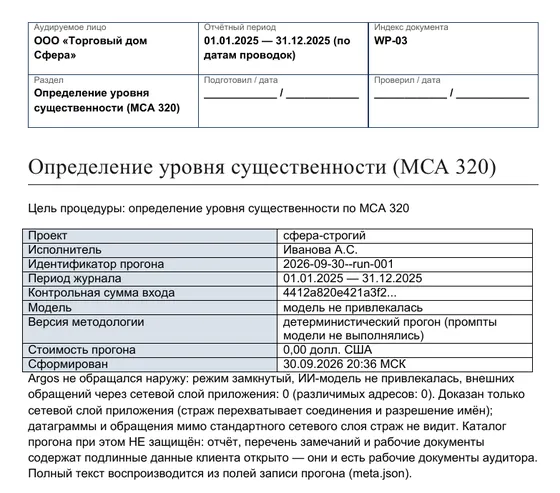
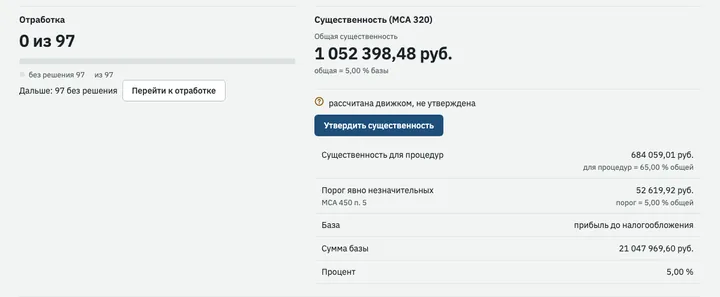
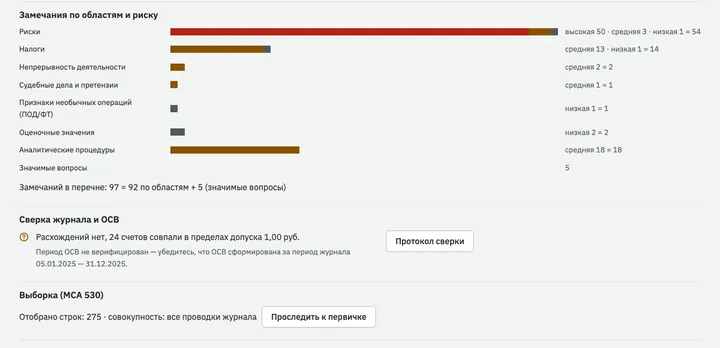
Below is a run on the fictitious company “Demo Opt”: journal entries and trial balance for 2025, the prior-year trial balance, pseudonymised copies, closed circuit.3
- Materiality under ISA 320: overall, performance materiality and the clearly trivial threshold, with the benchmark and percentage. It is a reference point: until the auditor approves it, it is marked “calculated by the engine, not approved”.
- 97 items in the list: 92 findings by area and risk level and 5 significant matters placed at the top of the review.
- Journal to trial balance reconciliation: 24 accounts agreed within a tolerance of 1 rouble.
- Sent to a model: nothing, and this is recorded in the run summary.
What Argos does not do
We state the limits ourselves, so that you know them before the pilot.
- It does not exercise judgementIt does not form an opinion, does not replace the audit plan or required procedures, and draws no conclusion on fraud or on whether tax positions are lawful.
- It can miss a misstatementArgos may report “not detected” where a misstatement exists. The auditor reaches the conclusion on an area through their own procedures.
- It does not fully cover assertionsValuation of receivables, inventories, investments and fixed assets, and completeness of payables, are not covered by any run.
- It does not invent figures without dataIt does not recalculate accounting estimates, exchange differences or industry-specific taxes. Where data is missing, it reports “not performed” and gives the reason.
- It works only with what the auditor has loadedIt sends no letters, receives no replies, does not test controls and does not connect directly to the 1C database.
- A risk score is not a sampleSelecting entries by risk score is not sampling under ISA 500. Quality measurements were made on synthetic journals.
- Checksums are not a sealThey show that an audit file has been changed, but do not prevent it and do not replace an electronic signature.
- Some tables are still draftsThe table of non-statistical sampling factors is a draft: one cell out of sixteen has been verified, and the document says so plainly.
A pilot on one of your firm’s engagements
You choose a closed engagement from last season, and your auditor takes it through Argos from client profile to audit file sign-off. You can compare the result with what the team has already done by hand, and the time with your timesheets. The pilot audit file is not added to the closed engagement’s file: the final audit file has already been assembled (ISA 230, paragraphs 14-16).
How the pilot works
- We choose one closed engagement from last seasonfirm
- Installation on the firm’s computer, first run on demonstration datadeveloper together with a member of the firm’s staff
- Export of the client’s journal entries and trial balance from 1C, list of related partiesfirm
- Run, review of the result, working through the findingsthe firm’s auditor; the developer helps with the software and does not see client data without the client’s written consent
- Audit file sign-off and package assemblyengagement partner
- Closing meeting: what the product found, how much time it took by your timesheets, what to improvetogether
What we need from the firm
- Journal entries and trial balance from 1C:Accounting 8.3 for the period under audit. Optionally, a list of related parties and source documents.
- An auditor’s computer running macOS with Docker and disk encryption.
- An auditor to carry out the engagement in the product, and an engagement partner to sign off.
- The first run in closed circuit. A run with a model only after the client’s written consent and on a pseudonymised copy.
Questions and answers
Will Argos replace the auditor?
No. Argos prepares the groundwork for the auditor’s judgement and does not exercise judgement itself: it does not form an opinion and does not replace the audit plan or required procedures. The decision on each finding is entered by the auditor, with an author and rationale. The auditor’s report is signed by the auditor.
Where is the artificial intelligence?
Journal tests, ISA calculations and sampling are done by the software, which also prepares the draft working papers. In closed-circuit mode no model is called at all. A language model is connected only if the firm decides so, to help review findings.
A run with an external model is possible only with the client’s written consent: a pseudonymised copy is still covered by audit confidentiality. The model receives the copy with pseudonyms, which the auditor checks before it is sent. An un-pseudonymised journal is sent only if the auditor specifically ticks this at launch, and this is recorded in the run profile. For a foreign model provider there is also a ban on storing audit documents and data from them outside Russia (Part 4, Article 13 of Federal Law No. 307-FZ).
What data is needed, and does Argos connect to the 1C database?
You need the journal entries and trial balance from 1C:Accounting 8.3 for the period under audit, in Excel or CSV. Optionally, a list of related parties, the prior-year trial balance and source documents. A column mapping wizard handles non-standard exports.
Argos does not connect directly to the 1C database, only to exports.
Who sees the client’s data?
The run and the review are carried out by your auditor on the firm’s computer. In closed-circuit mode client data does not leave that computer. The developer sees it only with the client’s written consent (Part 3, Article 9 of Federal Law No. 307-FZ).
What needs to be installed?
An auditor’s computer with Docker and disk encryption. Argos has been tested on macOS and has not yet been run on Windows. The workstation opens in a browser on that machine only; sign-in uses a one-time ticket. During the pilot we install it together with a member of your staff.
Is it suitable for clients in specific industries?
The product has 13 industry groups: retail and wholesale trade, services, manufacturing, construction, extraction, IT, property development, non-profit organisations, agriculture, transport, energy and housing and utilities, leasing. The auditor states the industry, and the group adds procedures and judgement cards with the legal reference and a list of documents to request.
On top of the industry, procedures on representation apply: state defence procurement and procurement under Federal Laws 44-FZ and 223-FZ.
Will the audit file pass external quality review?
The assessment is made by the reviewer; the product does not promise it. Argos prepares the audit file under ISA 230: permanent references, “Prepared by / Reviewed by”, dates, audit trail. In the readiness checklist an item is closed only on evidence, and each item shows what evidences it and under which provision.
A demo and a pilot on your engagement
We will show the product on a demonstration company, then take one closed engagement from last season through it. The first run is in closed circuit, and the decision on every finding stays with your auditor.
- Responsible for the product
- Filipp Mikheev, developer of Argos
- feelmetttt@gmail.com
- Telegram
- @filly_tt